Prediction: Laptop Screen Extenders Could Be the 2026 Remote-Work Gadget Amazon Shoppers Start Testing
Must Grab That is reader-supported. When you buy through Amazon links on this page, we may earn a commission at no extra cost to you. Predictions are editorial opinions, not guarantees of virality, price, availability, or future sales.
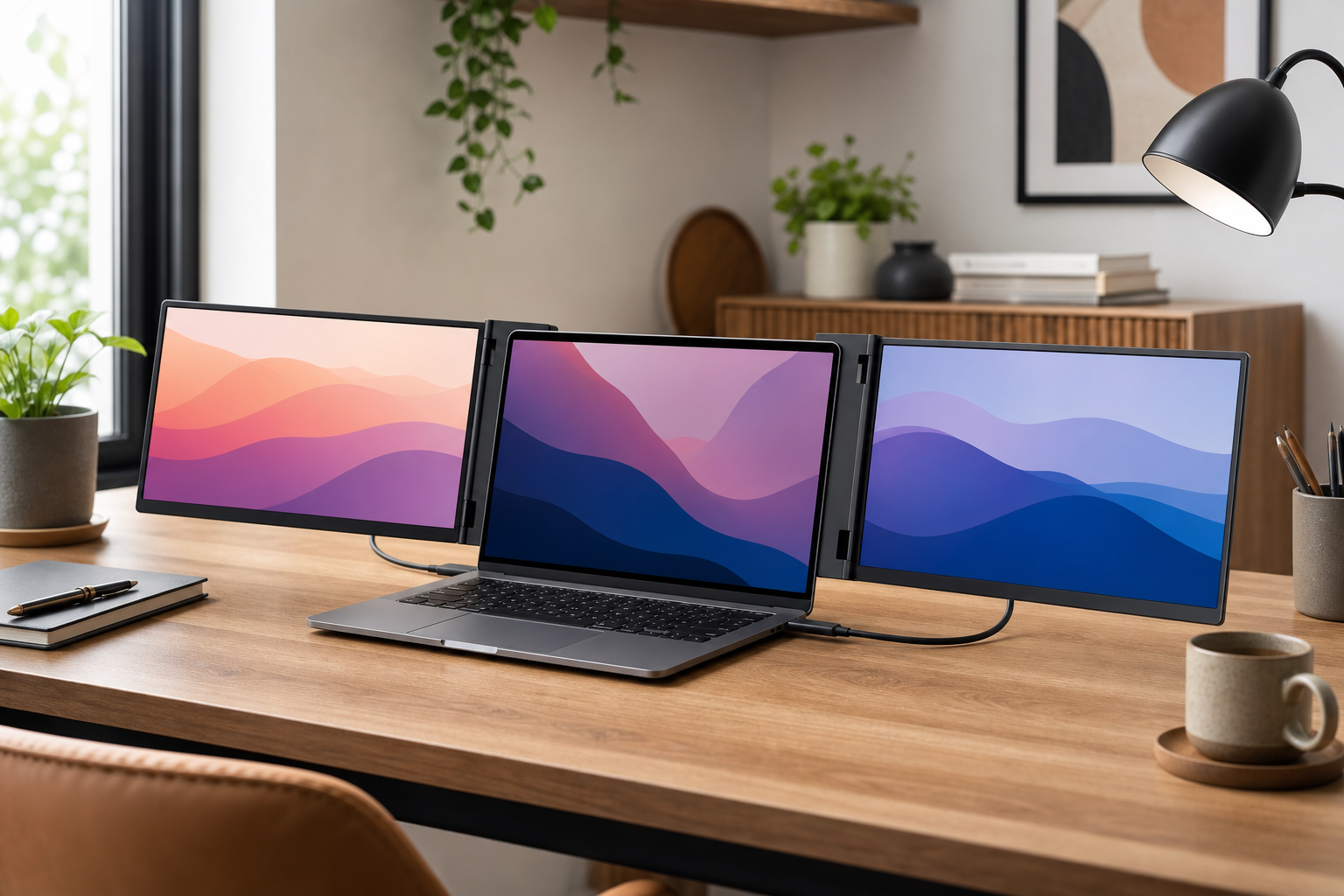
Remote work has already made standing desks, monitor light bars, walking pads, laptop stands, and cable organizers feel normal. The next home-office product category that looks ready for a bigger Amazon moment is the laptop screen extender: a clip-on or fold-out monitor system that gives a laptop one or two extra displays without building a permanent desk setup.
Quick CTA: Browse current laptop screen extenders on Amazon here: shop laptop screen extenders. If you want a simpler setup, compare portable laptop monitors too.
Why Laptop Screen Extenders Could Trend in 2026
The strongest trend signal is simple: laptop screens are convenient, but cramped. Many people now work from kitchen tables, coworking spaces, small apartments, hotels, and shared home offices. They want the productivity boost of a second monitor without committing to a full desk, arm mount, or permanent cable nest.
A laptop screen extender makes a visually obvious promise. Snap it onto a laptop, unfold a side display, and suddenly the tiny workspace looks like a mobile command center. That kind of before-and-after is tailor-made for short-form video, even if the real buying decision still comes down to weight, compatibility, and whether the setup is stable enough for daily use.
This category also benefits from the broader “portable productivity” wave. Amazon shoppers already understand portable monitors, USB-C hubs, travel keyboards, laptop stands, and compact chargers. A screen extender combines several of those ideas into one more dramatic upgrade.
What the Product Actually Is
A laptop screen extender is usually an add-on display system designed to attach to or sit directly behind a laptop. Some models add one extra screen. Others add two side screens for a triple-display setup. Most connect through USB-C, HDMI, or a combination of cables depending on the laptop and operating system.
The category is different from a regular portable monitor. A portable monitor is often a separate slab with its own kickstand or case. A screen extender is more integrated: it is meant to travel with the laptop and line up beside the main display. That integrated look is why the category feels more social-media friendly, but it is also why fit and compatibility matter so much.
Who Will Buy It First
Remote workers without permanent desks
The most obvious buyer is someone who needs more screen space but does not have a dedicated office. If you work from a dining table, guest room, or shared apartment, a full monitor may be inconvenient. A foldable extender promises a setup you can deploy and put away.
Travel-heavy professionals
Consultants, founders, sales teams, analysts, and digital nomads may like the idea of bringing extra screens to hotels or client sites. For spreadsheet work, email plus documents, dashboards, and video calls, the appeal is obvious.
Students and creators
Students can keep notes on one screen and research on another. Creators can put a script, editing timeline, chat window, or reference material beside the main screen. The category is not only for corporate work, which broadens its potential audience.
The TikTok and Social Triggers
The social hook is strong because the product photographs well. A laptop opening into two or three screens creates an instant “wait, what is that?” moment. It also fits several content formats that already perform well: desk setup tours, remote-work hacks, travel gear packing, productivity resets, and “things I bought for my home office” videos.
Another trigger is the visible contrast between cramped and expanded. A creator can show a single laptop screen overloaded with tabs, then unfold a second or third screen and distribute the work. Whether or not everyone needs that setup, the transformation is easy to understand in five seconds.
The caveat: visual virality does not equal universal usefulness. A laptop screen extender can look incredible in a video and still be the wrong buy if it is too heavy, drains battery too quickly, blocks ports, or requires awkward drivers. That gap between wow-factor and daily practicality is exactly why shoppers need a careful checklist.
What to Look For
- Laptop size compatibility: confirm supported laptop sizes and whether the attachment works with your screen shape and bezel.
- Connection type: USB-C with DisplayPort support is convenient, but not every USB-C port supports video. Some laptops may need HDMI plus USB power.
- Operating system support: check Windows, macOS, ChromeOS, and any driver requirements before buying.
- Weight: a heavier extender can make the laptop feel top-heavy or less portable.
- Stability: look for stands, kickstands, or support feet that keep the side screens from wobbling.
- Resolution and brightness: extra screens do not need to be perfect, but dim, low-resolution panels can become tiring.
- Return policy: compatibility is tricky enough that a reasonable return window matters.
What to Avoid
Avoid buying purely from the most dramatic product photo. Triple-screen setups look impressive, but two extra displays also mean more weight, more cables, and more chances for compatibility problems. If you only need email or notes beside your main work, a single portable monitor may be smarter.
Avoid listings that do not clearly explain connection requirements. “Works with USB-C” is not specific enough. Your laptop may need USB-C video output, Thunderbolt, HDMI, or driver support. If the listing language is vague, move slowly.
Avoid assuming it will be comfortable on an airplane tray table. Many screen extenders are portable in the sense that they can be transported, not necessarily in the sense that they work well in every cramped space. Hotels, coworking desks, and kitchen tables are more realistic use cases than economy seats.
Amazon Buying Checklist
- Confirm your laptop screen size and operating system.
- Check whether your USB-C port supports video output.
- Read recent reviews from shoppers using the same laptop brand or model family.
- Look for real photos that show cable routing and desk footprint.
- Compare one-screen extenders against separate portable monitors.
- Check weight if you plan to travel with it.
- Make sure the seller explains returns, warranty, and included cables.
How It Compares to Other Desk Upgrades
Must Grab That has already covered several home-office upgrades that solve adjacent problems, including monitor light bars, standing desks, and home office upgrades for better focus. Screen extenders are different because they are aimed at people who cannot or do not want to build a permanent workstation.
Compared with a monitor light bar, a screen extender is a bigger purchase and a bigger compatibility risk. Compared with a standing desk, it is more portable. Compared with a standard portable monitor, it looks cleaner when attached but may be less flexible. The right choice depends on whether you prioritize a fast mobile setup or a more ergonomic permanent desk.
Caveats That Could Slow the Trend
The category has a few real hurdles. First is ergonomics. More screens do not automatically mean better posture. If the laptop is too low, adding side screens can simply spread neck strain across a wider area. Many users will still need a laptop stand, external keyboard, or better chair setup.
Second is battery drain. Extra displays require power. If you work unplugged often, battery life can become a problem. Third is desk stability. Some extenders are better suited to sturdy tables than soft couches or tiny cafe surfaces.
Finally, quality will vary widely. This is a category where shoppers should be skeptical of generic listings, unclear specs, and overly perfect images. The best versions could become genuinely useful; the worst versions may become return-box clutter.
Prediction Verdict
Laptop screen extenders have the right mix of visual wow-factor, real remote-work utility, and Amazon-search friendliness to become a larger 2026 trend. They solve a problem people already understand: one laptop screen is often not enough. They also create the kind of setup transformation that social video loves.
Prediction: laptop screen extenders could become a breakout remote-work Amazon category in 2026, especially among hybrid workers, students, and travel-heavy professionals. The best buys will be the models with clear compatibility details, stable support, sensible weight, and honest connection requirements.
Shop/compare: browse laptop screen extenders on Amazon or compare portable laptop monitors.